REVIEW · AUSTIN
An Exciting Scavenger Hunt: Austin Capitol Sights & Downtown Gems
Book on Viator →Operated by Let's Roam · Bookable on Viator
Austin’s downtown feels like a live game board.
This app-led Austin scavenger hunt takes you through iconic spots near the Texas Capitol and downtown, with challenges that you answer on-site by using the phone. I love that you’re not stuck waiting for a guide—you can start when you want, then move at your own pace with the Let’s Roam app. I also like the competitive twist: each person gets an interactive role and photo prompts to earn points as you go.
One possible drawback is the friction level with the app. Some people feel the experience leans on trivia that you could find online, and they also report that the app does not function like a turn-by-turn GPS, so you may end up guessing your way between stops.
In This Review
- Key things to know before you play
- How an app-led hunt changes the Austin experience
- Starting at 1100 Congress Ave: what the route feels like
- The phone setup that makes or breaks it
- How the photo challenges and roles work in practice
- The 13-stop run around Austin’s Capitol and downtown
- Stop 1: Millett Opera House
- Stop 2: Wooldridge Square
- Stop 3: Texas Governor’s Mansion
- Stop 4: Austin History Center
- Stop 5: Paramount Theatre
- Stop 6: Moonlight Towers
- Stop 7: Bremond Block
- Stop 8: Austin Central Library (Austin Public Library)
- Stop 9: Old Bakery & Emporium
- Stop 10: Texas Capitol
- Stop 11: Capitol Complex Visitors Center
- Stop 12: The Contemporary Austin – Jones Center
- Stop 13: Saint Mary Cathedral
- Price and value: what $14.99 per person buys you
- Comfort and timing: small choices that prevent big headaches
- When this Austin scavenger hunt is a great match
- When you should think twice
- Should you book the Austin Capitol Sights & Downtown Gems scavenger hunt?
- FAQ
- How long does the scavenger hunt take?
- Where do we start and where do we end?
- Do we need a tour guide?
- What do I need to do before I start?
- Are parking, food, or entrance tickets included?
- What if my phone battery is low?
Key things to know before you play

- Start any time, no guide on deck: it’s self-guided and private to your group.
- Roles for each player: challenges vary by person, so it’s not one-size-fits-all.
- Photo challenges for points: you’ll be rewarded for capturing answers, not just reading them.
- 13 downtown-to-Capitol stops: expect a tight route through major landmarks.
- Your phone does the work: download, redeem, navigate, and complete challenges in the app.
- What’s not included: parking, food, and any entrance tickets.
How an app-led hunt changes the Austin experience

An Austin scavenger hunt sounds like a gimmick until you realize what it’s really doing. It slows you down on purpose. You’re walking the same downtown areas you’d hit anyway, but instead of just sightseeing, you’re hunting for details that live on plaques, statues, public art, and signage.
The self-guided setup is the big practical win. You don’t need to coordinate anyone’s schedule down to the minute, and you’re not tethered to a group pace. If you like to linger at a landmark because the architecture grabs you—or you need to stop for a snack break later—you can.
You’re also paying for structure, not a person in a hat. The phone becomes your “guide,” and the app becomes the engine that sends you to the next checkpoint with tasks. That’s exactly why a charged smartphone is not optional.
You can also read our reviews of more tours and experiences in Austin.



Starting at 1100 Congress Ave: what the route feels like
Your hunt begins at 1100 Congress Ave., Austin, TX 78701, and it ends back at the same starting area. The activity has operating hours listed from 8:00 AM to 5:00 PM every day, so if you want the smoothest experience, start somewhere in that window rather than at the fringes.
Because it’s designed around a compact cluster of downtown and Capitol-area landmarks, the walking rhythm is predictable: short hops, frequent “stop and check” moments, then back to moving. The total time target is about 1.5 to 2 hours, which means you’re not doing a long haul. You’re playing a focused course.
The phone setup that makes or breaks it

This is a mobile ticket experience using the Let’s Roam app. The core workflow is: download the app, register, redeem your ticket in the app, then follow the prompts for challenges and navigation.
Here’s what matters for your real-world success:
- Fully charged device: you’ll be using your phone to navigate and interact with challenges.
- Bring a power bank if you can: if your battery dips, your game ends early.
- Expect to read prompts on-site: answers are often tied to what’s in front of you, not generic trivia floating in space.
And one note on expectations. Some people end up frustrated when the app doesn’t feel like it’s guiding them turn-by-turn. So think of it as “helpful direction plus challenges,” not “guaranteed GPS route with zero ambiguity.”
How the photo challenges and roles work in practice
The game gives each participant an interactive role, and the challenges can vary by person. That’s what keeps a group from doing the exact same thing at the exact same time. It also helps avoid the classic scavenger hunt issue where everyone becomes a passive spectator.
You’ll get texted photo challenges and fun activities to do with your group, and you earn points for the best photos. Even if you’re not a photography person, you can still play well by treating it like a scavenger checklist: capture the scene the prompt asks for, then move on.
A smart strategy is to assign one person as the photo captain for each prompt. That way, you’re not all fumbling with the phone while you’re trying to find the exact detail the app wants.
The 13-stop run around Austin’s Capitol and downtown

Over roughly 1.5 to 2 hours, you’ll hit 13 checkpoints. Not every stop will take long, but each one is meant to trigger a different kind of challenge. Many tasks are designed to be completed by looking closely at what’s already there—so bring your attention, not just your walking shoes.






Stop 1: Millett Opera House
This is where the hunt starts, so it’s your warm-up. Expect an on-site question or activity that uses details you can spot around the building and area.
Practical tip: don’t overthink it. Early challenges are often meant to teach you how the app wants you to interact.
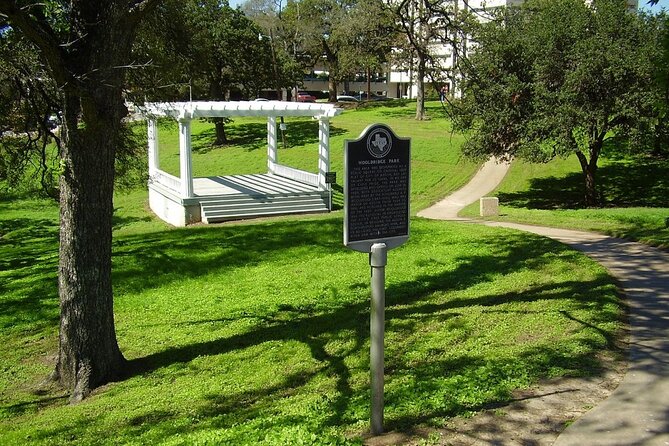
Stop 2: Wooldridge Square
Wooldridge Square is another “check the details” moment. This is the kind of spot where a photo prompt can work well because the setting gives you plenty of visible elements to include.
If your group splits into roles, this is a good place for everyone to get comfortable with how the tasks arrive on their phones.
Stop 3: Texas Governor’s Mansion
This stop nudges you into the Capitol-adjacent feel of Austin. Your tasks here are likely tied to visible features and nearby informational elements.
Consideration: if you want to move quickly, keep an eye on your phone prompts while you’re still walking in. Pausing too late can make you feel rushed.
Stop 4: Austin History Center
A history-minded building is a natural match for scavenger prompts that point you toward plaques, signs, and interpretive materials. Even if you’re not spending time indoors, you can still do plenty with exterior details and nearby posted info.
This stop also works well for groups who like a bit of learning without turning the whole day into a museum sprint.
Stop 5: Paramount Theatre
The Paramount Theatre area is a strong photo-challenge candidate. You’ll probably be answering questions that depend on what you can see in the streetscape around the venue.
If you’re playing with friends, bring a simple plan: decide who shoots, who checks the phone, and who watches the rest of the group so no one gets left behind.
Stop 6: Moonlight Towers
This checkpoint is likely built for close looking. When the tasks depend on visible features, landmarks like towers can be perfect because they make it easier to orient yourself visually.
Watch your pace here. The hunt is short enough that you don’t want to get stuck trying to over-solve a clue.
Stop 7: Bremond Block
Now you’re transitioning through the downtown fabric rather than just Capitol landmarks. This is often where scavenger hunts become fun because you’re not only chasing big monuments—you’re also noticing the smaller street details.
If the app feels vague between stops, this is a good checkpoint to slow down and verify you’re in the right area before continuing.
Stop 8: Austin Central Library (Austin Public Library)
A public library stop is useful because it often encourages observation-based tasks. Even if you don’t go inside, you can still play the hunt by focusing on the materials you encounter on-site.
Important: admission tickets to entrances are not included, so plan on doing what you can without assuming paid entry will be part of the route.
Stop 9: Old Bakery & Emporium
This is a classic kind of checkpoint where the environment helps the game feel lively. You’ll be looking for details your phone prompts ask for, which may include visual elements that are easy to capture for a photo challenge.
Food isn’t included, but if you want a snack later, this is a good mental cue that you’ll likely pass places to buy something on your own.
Stop 10: Texas Capitol
This is the headline stop. The hunt’s whole identity is anchored here—so expect a challenge that makes you look closely at something tied to the Capitol and its immediate surroundings.
If your group likes iconic architecture photos, this is where you’ll probably want to pause long enough to do the shot properly instead of rushing through the clue.
Stop 11: Capitol Complex Visitors Center
This is a natural place for info-related tasks. You may get prompts that are meant to be answered by reading posted materials or observing elements around the visitors area.
Practical note: because entrance admissions aren’t included, don’t build your timing around going deeper inside unless you’re already sure it’s free for you.
Stop 12: The Contemporary Austin – Jones Center
Art-related prompts can be a strong fit for this stop. The hunt already says challenges may be hidden on art and more, so you’ll likely be hunting for visible details that match your role.
If the weather is rough, art areas can still keep the game engaging without a lot of extra walking time.
Stop 13: Saint Mary Cathedral
This is a satisfying finish because it’s a recognizable landmark. Your final tasks likely reward careful looking and on-site verification, then you roll back toward the starting point.
Endgame tip: after you finish your last photo or answer, take a quick look around like a regular sightseer. It’s a good habit that keeps the “game” from making you forget to enjoy Austin.
Price and value: what $14.99 per person buys you
At $14.99 per person for about 2 hours, you’re buying an app-based scavenger structure, not guided storytelling or museum entry. The included item is access to the Let’s Roam app, and that’s the heart of the value.
If you like self-directed activities and you enjoy point-based photo prompts, you can feel like you got your money’s worth quickly. The route is packed with famous Austin names, but you’re not paying for tickets to go inside. You’re paying for the game wrapper that tells you what to look for and keeps everyone moving.
If you’re someone who expects the app to do heavy-duty direction, the value calculation changes. A sharp complaint is that the app can feel complicated and that the trivia-style questions don’t feel special when compared to what you can find elsewhere for free. If that sounds like you, you might treat this as a “light challenge” rather than a must-do learning experience.
Comfort and timing: small choices that prevent big headaches
This is a walking game, and the guidance lists moderate physical fitness. Comfortable shoes are not optional, especially in downtown where you’ll be stopping and starting.
Weather matters too. The recommendation is straightforward: check the forecast and dress for the day. Since you’ll be relying on your phone, avoid situations where rain or cold makes your device difficult to use.
Also, remember it’s private to your group. That’s great if you want control, but it also means you won’t have a guide to resolve confusion quickly. Your best “backup plan” is simply using your phone battery and taking a careful look at where you are before committing to the next clue.
When this Austin scavenger hunt is a great match
This hunt is a strong fit if you want:
- a self-paced way to cover the Capitol and downtown without planning every step
- an activity that gives each person something to do (not just watch)
- a fun way to slow down and notice details you might otherwise ignore
- light competition through photo prompts and points
It can also be a good choice for couples, small groups, and anyone visiting Austin for a short window who wants a structured “downtown loop” rather than a list of random landmarks.
When you should think twice
I’d think twice if you want turn-by-turn navigation like a GPS map and nothing less. Some players report it can feel like you’re paying for app access that doesn’t fully guide you, forcing you to guess between points.
I’d also think twice if trivia for its own sake is your least favorite travel style. Since the hunt uses questions tied to on-site details, it can still end up feeling like generic knowledge checks if the prompts don’t land for you.
Should you book the Austin Capitol Sights & Downtown Gems scavenger hunt?
I’d book it if you’re the type who enjoys problem-solving in the moment and you’re happy to use your phone as the “guide.” The combination of app-led start-anytime flexibility, roles for each participant, and photo-based points can make a short Austin visit feel active and memorable.
I’d skip it if you’re expecting a highly guided, expertly directed experience or if you strongly dislike app-based scavenger formats. In that case, the risk is paying for structure you don’t find especially helpful, especially if you end up doing a lot of figuring-out on your own.
If you do book, treat it like a fun walk with prompts—not a replacement for paid attractions or a guaranteed frictionless route. If your device is charged and your group is ready to play, you’ll likely enjoy the pacing and the chance to see Austin by looking closer.
FAQ
How long does the scavenger hunt take?
The hunt runs for about 1.5 to 2 hours.
Where do we start and where do we end?
You start at 1100 Congress Ave., Austin, TX 78701, and the activity ends back at the same meeting point.
Do we need a tour guide?
No. It’s app-led and self-guided, so you can start at any time without a tour guide or reservation.
What do I need to do before I start?
Download the Let’s Roam app, register, and redeem your tickets in the app. Then use the app to navigate and complete the challenges.
Are parking, food, or entrance tickets included?
No. Parking fees, food and beverages, and admission tickets to entrances are not included.
What if my phone battery is low?
You’re told to keep your device fully charged before you start, and to bring a power bank if you need one.